
The ServiceNow reports and dashboards you can’t build out of the box.
VividCharts is a ServiceNow Store app that turns your ServiceNow data into polished reports and dashboards you can present or export to PowerPoint.
Trusted by ServiceNow teams




The data is in ServiceNow. The report isn’t.
Every week or month, someone exports the data to a spreadsheet and rebuilds the deck by hand.
-
Native reporting can’t build the report you need
The chart won’t render the way you want, or the metric takes math a standard report can’t do. VividCharts builds both from the same ServiceNow data.
-
Native exports aren’t ready to present
ServiceNow’s PowerPoint export gives you static charts with no template and no project details. VividCharts exports with your template, your fields, and your charts.
-
Executives can’t tell if you’re on target
The dashboard is full of numbers, but it doesn’t say whether you’re in the green or the red, and executives won’t dig to find out. VividCharts reports lead with that answer.
Polished and ready to send to stakeholders.
Status reports and steering committee decks go straight to stakeholders, as a PowerPoint file or a link.
- Your logo, colors, and layout on every report
- Export to PowerPoint in one click
- Share with people who don’t have a ServiceNow license


Hear it from our customers.
“With VividCharts, we went from rebuilding the same decks every week to opening a report that’s already right. Our product owners got their time back.”
“The executive dashboards we built with VividCharts give a clean, real-time view of key metrics without having to dig around or recreate each quarter.”
“We had a manual process that took 4 people 2 weeks a month to complete a PowerPoint doc. Now with VividCharts, it’s 6 clicks.”
What your ServiceNow reporting could look like.
Ready-made templates for every ServiceNow team. They work alongside your native reports, on the same data.
Project Status
RAG status and milestones for every project, one page each.
View report
Portfolio Steerco Deck
Portfolio RAG and spend vs. budget for the steering committee.
View report
Strategic Roadmap Visuals
Roadmaps that keep their hierarchy in front of executives.
View report
Incident KPI Review
Incident volume and resolution trends by service, month over month.
View report
SLA Monthly Scorecard
SLA attainment by service, with the incidents behind each breach.
View report
Pre-CAB Change Tracker
Every change on the agenda, summarized before CAB starts.
View report
Major Incident Executive Report
Impact and response timeline for the executive update.
View report
Problem Review
Open problems linked to the incidents they’re causing.
View report
Program Status
Every project in the program rolled up into one status.
View report
Demand Review
The demand pipeline ranked by value and effort.
View report
Project Charter
A board-ready charter for every new IT project.
View report
Risk Review Report
Open risks and their owners, for the risk review.
View report
SAM Executive Report
License position and software spend, for leadership.
View report
CWM Status Report
Progress and blockers across your CWM boards.
View report
Automated MBR / QBR
Monthly and quarterly customer reviews, built from your case data.
View report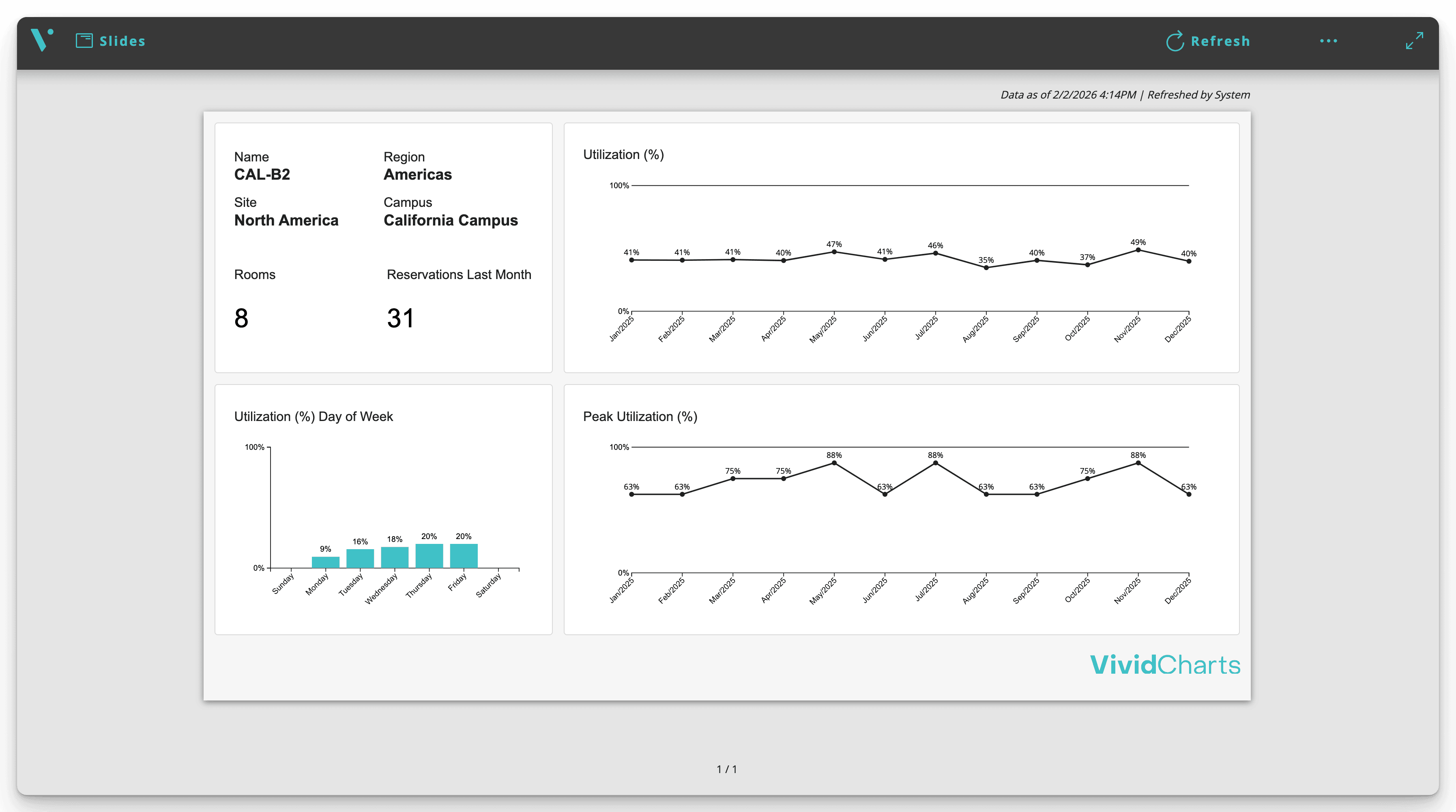
Building Utilization Report
Occupancy by building and floor, with cost per seat.
View report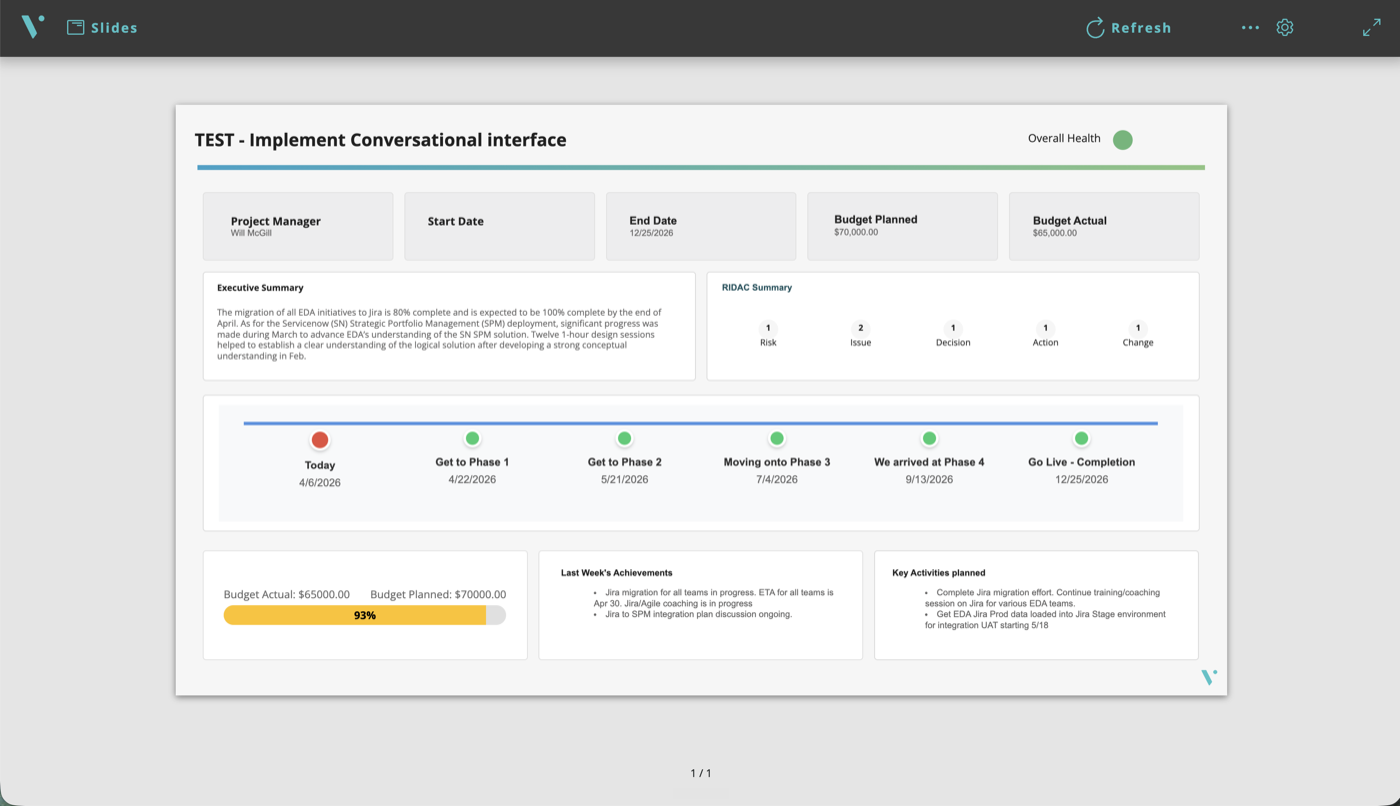
Build one template. Every project gets its own report.
Same layout, its own numbers, refreshed on a schedule.
- Start from templates for status reports, roadmaps, steering committee decks, and ITSM reviews
- Add a project and its report already exists
- Change the template once, and every report updates

No reporting team? Use ours.
You know what the report needs to say. We have the people and the tools to build it inside your ServiceNow.
-
Reporting built for you
We build the templates and connect the data, then publish each cycle so your team doesn’t have to.
-
A reporting queue you control
Send us the reports you need and set the priority. We work through them in order, so one busy ServiceNow admin isn’t the bottleneck. AI handles the first pass, and a VividCharts expert checks every deliverable before it reaches anyone.
Runs inside your ServiceNow instance.
VividCharts installs from the ServiceNow Store as a scoped app. Every report in the app follows the access controls you already have.
VividCharts reads your records in place and renders every report in-platform.
- Installs from the ServiceNow Store
- Follows your existing access controls in the app
- No VividCharts-hosted processing


Nothing routes through a VividCharts cloud
Show us the report you dread building.
We’ll show it to you running on your own ServiceNow data, ready for your next review.